







Kaizen Teams

Dropdown
Dropdown arrow for the table of contents.

Table of Contents

Clock icon for reading time.
Time to read

·

12

Calendar icon for the publish date.
Published on

·

July 17, 2026

Refresh icon for the last updated date.
Last updated on

·

August 27, 2026

Santiago Chiappa, Backend Developer at Kaizen Softworks

Santiago Chiappa

LinkedIn icon.

Motorcycle enthusiast

Backend Developer

AI

AI

UX Design

UX Design

Generative UI: what it is, how it works, and when to use it

Calendar icon for the publish date.
Published on

·

August 27, 2026

Refresh icon for the last updated date.
Last updated on

·

August 27, 2026

Clock icon for reading time.
Time to read

·

12

Santiago Chiappa, Backend Developer at Kaizen Softworks

Santiago Chiappa

LinkedIn icon.

Backend Developer

‍Generative UI is a full-stack architecture that lets AI create, modify, and render user interfaces in real time, based on what each user needs at that exact moment. Instead of static, predefined screens, the interface assembles itself on the fly: a bar chart, a table, a comparison card when you're comparing things.

We've been building proofs of concept with it for the past few weeks. Most of what's written about generative UI is either too abstract or too exciting, so this is our attempt at neither: what it is, how it works, where it helps, where it doesn't, and what we learned from two demos we built.

The short version

  • Generative UI means the AI designs the screen that answers your question, not just the answer.
  • In production, most systems don't let the AI write code. It configures pre-built components. Safer, and good enough.
  • It shines in open-ended workflows like reporting and data exploration, where you can't pre-design every screen someone might need.
  • It complements standard UI. It doesn't replace it. Anyone telling you otherwise is selling something.

What is generative UI?

Generative UI is a full-stack architecture: the backend talks to the LLM, decides what the answer should look like, and picks the components, while the frontend renders them and handles how the user interacts with what’s on screen.

Compare that with how interfaces have always worked. A designer decides what goes on each screen, a developer builds it, and every user sees the same thing. Forever, or until the next redesign.

Generative UI flips that. The interface becomes dynamic and personal instead of static and universal. The AI doesn't just answer your question, it designs the screen that answers your question.

Dashboards and reporting are the most common use cases, but they're far from the only one. The same pattern works for dynamic forms, onboarding flows, and customer support, as it takes input just as easily as it presents output. It can even adjust font size, contrast, or layout for users with low vision, color blindness, or cognitive load.

‍

The three types of generative UI

There are three levels of generative UI, from most constrained to most open (Google Cloud, 2026):

  1. Static. Everything is pre-built. The AI picks which screen to show you from a fixed library. Low risk, low flexibility.
  2. Declarative. The AI assembles a JSON tree that specifies which UI components to use, in what order, with what properties. It doesn't write code. It configures pre-designed widgets. This balances the AI's flexibility with the system's stability.
  3. Open. The AI generates completely new code from scratch and the frontend renders it. Maximum flexibility, maximum risk.

Most production systems today use the declarative approach, and that's what this post assumes from here on. The AI isn't writing HTML or CSS freestyle. It selects components, fills in pre-designed widgets, and composes them into the right screen.

How does generative UI work?

Generative UI works by turning a user request into structured data that describes an interface, then rendering that data as real components. The flow looks like this:

  1. The user asks for something, explicitly or inferred from context.
  2. An LLM analyzes the request. It invokes tools, pulls data, and makes the design decisions: what to show and how.
  3. The system generates structured data describing both the components and the information they'll display.
  4. That schema travels to the frontend through the AG-UI protocol, a standard for communication between agents and frontends. It defines events that keep the agent's state in the backend synchronized with the frontend framework.
  5. The frontend transforms the schema into actual widgets and renders them.

To the user, the result feels like magic. Behind the scenes, it's structured data flowing through a well-defined pipeline. We prefer the second description. It's the one you can build on.

Pros and cons of generative UI

Generative UI trades real personalization and faster development for added latency, inference costs, and less predictable layouts. That's the honest version. Here are the details.

What you gain

Benefit Why it matters
Real personalization Each user sees the view they need, not the view designed for the average user. When that happens, conversion follows.
Flexibility that scales A small set of components combines into thousands of screens, including views you never explicitly built.
Faster development You build the component library once. The system composes it, instead of your team coding endless specific screens.

What you pay for it

Trade-offs What to watch
Latency There's an LLM in the middle, and that adds response time.
Token costs Every generated screen has an inference cost attached.
Less muscle memory The same request won't always render the same layout. Users can't build habits around pixel positions.
Privacy Sending data through an LLM means thinking carefully about what you send and where it goes.

None of these are dealbreakers. There are known techniques to mitigate each one. 

Generative UI examples: two working demos

We built two demos. One with fictional data, one on top of a tool we use every day.

Aurora Goods: a conversational e-commerce dashboard

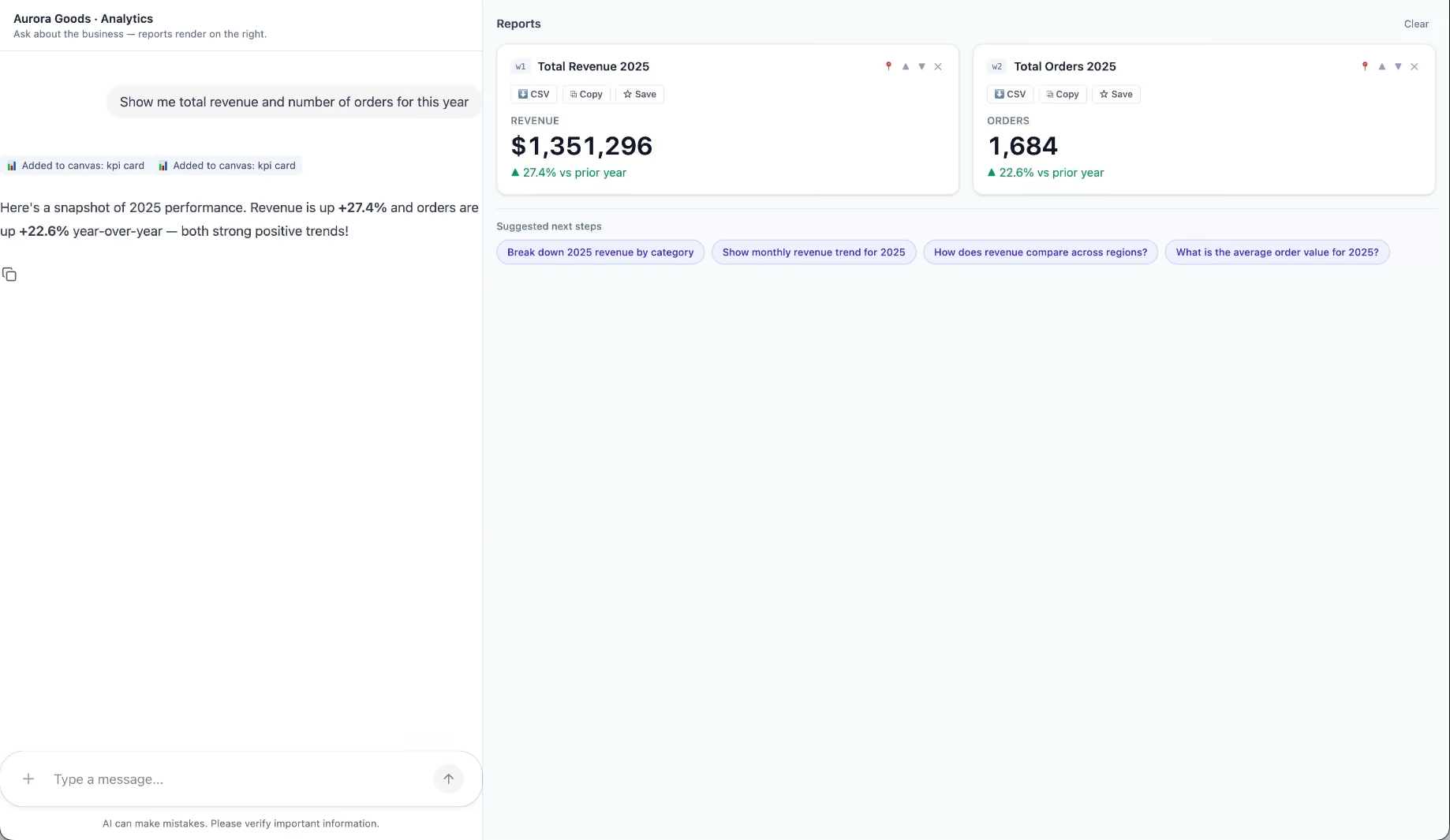
Aurora Goods is a fictional consumer e-commerce platform we created for the demo. The interface is simple: chat on the left, canvas on the right. You ask about the business, the LLM figures out what you need, pulls the data, and renders it visually.

Ask about 2025 sales and it shows the numbers on cards, with a short note on anything relevant. Ask it to break that down by region and it extends the same view instead of starting over, because it understands the second question builds on the first. This part took us a while to get right, and it's what makes the whole thing feel like a conversation rather than a search box.

The canvas isn't output-only either. You can click into any element and drill down: revenue by category, then inside electronics, then which products sold most.

You configure the widgets once. The system combines them and adds relevant commentary on the spot.

An internal reporting screen for our time-tracking tool

The second demo is closer to home: a generative reporting layer on top of the time-tracking tool we use every day at Kaizen. The questions in this demo are questions someone here has actually asked.

Instead of building dozens of hyper-specific reports, a small amount of code now handles virtually unlimited queries. How many hours were logged in May? Which anomalies showed up in April? How do billable and non-billable hours compare across two months? Who worked on a given project last month, and for how long? Each answer arrives as the right visualization: cards, lists, bar charts, plus a short summary that's easy to scan.

Two details won us over. The LLM suggests next steps, so exploring the data becomes a conversation. And when it's not sure, it asks instead of assuming. Ask for the hours of someone named Alex and, since we have more than one Alex on the team, it asks which one before answering.

Generative UI complements standard UI. That's the point.

Generative UI is a complement, not a replacement. Standard interfaces still win for stable, repetitive workflows where consistency matters. Nobody wants their checkout button to be creative. Generative UI wins where the workflow is complex and the questions are unpredictable.

It also changes what design systems are for. Beyond designing components and screens, teams will need to define semantic rules: how the AI should react to uncertainty, which interfaces match which intentions, and the guardrails that keep generated screens functional and safe.

That's a new kind of design work. And it's already starting.

Want to see generative UI applied to your own data? 

We build working proofs of concept in two weeks. Your data, your workflows, a real thing you can click.

Start a conversation.

‍Generative UI is a full-stack architecture that lets AI create, modify, and render user interfaces in real time, based on what each user needs at that exact moment. Instead of static, predefined screens, the interface assembles itself on the fly: a bar chart, a table, a comparison card when you're comparing things.

We've been building proofs of concept with it for the past few weeks. Most of what's written about generative UI is either too abstract or too exciting, so this is our attempt at neither: what it is, how it works, where it helps, where it doesn't, and what we learned from two demos we built.

The short version

  • Generative UI means the AI designs the screen that answers your question, not just the answer.
  • In production, most systems don't let the AI write code. It configures pre-built components. Safer, and good enough.
  • It shines in open-ended workflows like reporting and data exploration, where you can't pre-design every screen someone might need.
  • It complements standard UI. It doesn't replace it. Anyone telling you otherwise is selling something.

What is generative UI?

Generative UI is a full-stack architecture: the backend talks to the LLM, decides what the answer should look like, and picks the components, while the frontend renders them and handles how the user interacts with what’s on screen.

Compare that with how interfaces have always worked. A designer decides what goes on each screen, a developer builds it, and every user sees the same thing. Forever, or until the next redesign.

Generative UI flips that. The interface becomes dynamic and personal instead of static and universal. The AI doesn't just answer your question, it designs the screen that answers your question.

Dashboards and reporting are the most common use cases, but they're far from the only one. The same pattern works for dynamic forms, onboarding flows, and customer support, as it takes input just as easily as it presents output. It can even adjust font size, contrast, or layout for users with low vision, color blindness, or cognitive load.

‍

The three types of generative UI

There are three levels of generative UI, from most constrained to most open (Google Cloud, 2026):

  1. Static. Everything is pre-built. The AI picks which screen to show you from a fixed library. Low risk, low flexibility.
  2. Declarative. The AI assembles a JSON tree that specifies which UI components to use, in what order, with what properties. It doesn't write code. It configures pre-designed widgets. This balances the AI's flexibility with the system's stability.
  3. Open. The AI generates completely new code from scratch and the frontend renders it. Maximum flexibility, maximum risk.

Most production systems today use the declarative approach, and that's what this post assumes from here on. The AI isn't writing HTML or CSS freestyle. It selects components, fills in pre-designed widgets, and composes them into the right screen.

How does generative UI work?

Generative UI works by turning a user request into structured data that describes an interface, then rendering that data as real components. The flow looks like this:

  1. The user asks for something, explicitly or inferred from context.
  2. An LLM analyzes the request. It invokes tools, pulls data, and makes the design decisions: what to show and how.
  3. The system generates structured data describing both the components and the information they'll display.
  4. That schema travels to the frontend through the AG-UI protocol, a standard for communication between agents and frontends. It defines events that keep the agent's state in the backend synchronized with the frontend framework.
  5. The frontend transforms the schema into actual widgets and renders them.

To the user, the result feels like magic. Behind the scenes, it's structured data flowing through a well-defined pipeline. We prefer the second description. It's the one you can build on.

Pros and cons of generative UI

Generative UI trades real personalization and faster development for added latency, inference costs, and less predictable layouts. That's the honest version. Here are the details.

What you gain

Benefit Why it matters
Real personalization Each user sees the view they need, not the view designed for the average user. When that happens, conversion follows.
Flexibility that scales A small set of components combines into thousands of screens, including views you never explicitly built.
Faster development You build the component library once. The system composes it, instead of your team coding endless specific screens.

What you pay for it

Trade-offs What to watch
Latency There's an LLM in the middle, and that adds response time.
Token costs Every generated screen has an inference cost attached.
Less muscle memory The same request won't always render the same layout. Users can't build habits around pixel positions.
Privacy Sending data through an LLM means thinking carefully about what you send and where it goes.

None of these are dealbreakers. There are known techniques to mitigate each one. 

Generative UI examples: two working demos

We built two demos. One with fictional data, one on top of a tool we use every day.

Aurora Goods: a conversational e-commerce dashboard

Aurora Goods is a fictional consumer e-commerce platform we created for the demo. The interface is simple: chat on the left, canvas on the right. You ask about the business, the LLM figures out what you need, pulls the data, and renders it visually.

Ask about 2025 sales and it shows the numbers on cards, with a short note on anything relevant. Ask it to break that down by region and it extends the same view instead of starting over, because it understands the second question builds on the first. This part took us a while to get right, and it's what makes the whole thing feel like a conversation rather than a search box.

The canvas isn't output-only either. You can click into any element and drill down: revenue by category, then inside electronics, then which products sold most.

You configure the widgets once. The system combines them and adds relevant commentary on the spot.

An internal reporting screen for our time-tracking tool

The second demo is closer to home: a generative reporting layer on top of the time-tracking tool we use every day at Kaizen. The questions in this demo are questions someone here has actually asked.

Instead of building dozens of hyper-specific reports, a small amount of code now handles virtually unlimited queries. How many hours were logged in May? Which anomalies showed up in April? How do billable and non-billable hours compare across two months? Who worked on a given project last month, and for how long? Each answer arrives as the right visualization: cards, lists, bar charts, plus a short summary that's easy to scan.

Two details won us over. The LLM suggests next steps, so exploring the data becomes a conversation. And when it's not sure, it asks instead of assuming. Ask for the hours of someone named Alex and, since we have more than one Alex on the team, it asks which one before answering.

Generative UI complements standard UI. That's the point.

Generative UI is a complement, not a replacement. Standard interfaces still win for stable, repetitive workflows where consistency matters. Nobody wants their checkout button to be creative. Generative UI wins where the workflow is complex and the questions are unpredictable.

It also changes what design systems are for. Beyond designing components and screens, teams will need to define semantic rules: how the AI should react to uncertainty, which interfaces match which intentions, and the guardrails that keep generated screens functional and safe.

That's a new kind of design work. And it's already starting.

Want to see generative UI applied to your own data? 

We build working proofs of concept in two weeks. Your data, your workflows, a real thing you can click.

Start a conversation.

Common questions

What's the difference between generative UI and a chatbot?

A chatbot answers in text. Generative UI answers with interface: charts, tables, cards, and interactive elements composed in real time for your specific request. Both can live in the same product, like a chat panel that renders visual answers on a canvas.

Does the AI write the frontend code?

In the declarative approach, the most common in production, no. The AI outputs structured data describing which pre-built components to use and how. The frontend renders them.

What is the AG-UI protocol?

AG-UI is a standard for communication between AI agents and frontends. It defines events that synchronize the agent's state in the backend with the frontend framework, so generated interfaces stay consistent with what the agent is doing.

Is generative UI expensive to run?

There's an inference cost per generated view, plus added latency from the LLM. Whether that's worth it depends on the workflow. For complex, open-ended reporting, it usually is.

What do you need to implement generative UI?

Three things: a component library the AI can compose, an LLM that translates requests into structured schemas, and a protocol like AG-UI to keep backend and frontend in sync. You build the components once. The system does the rest.

Is generative UI the same as adaptive or personalized UI?

No. Adaptive UI adjusts pre-built layouts based on rules or user segments. Generative UI composes new views in real time from a user's specific request, using an AI model to make the design decisions.

‍

1
What is the difference between working with Kaizen versus a single designer?

Related Articles

View all articles

·

Oct 23, 2026

How to build high-fidelity prototypes with AI

How a design system lets Marketing and Product teams use AI to build on-brand prototypes, based on Kaizen’s own experience and turnaround numbers.

Clock icon for reading time.

12 read time

Read more

AI makes it easier for more people across a company to create a first visual version without relying on Design for every step.

Marketing can generate campaign assets. Product managers can turn ideas into prototypes. Teams can make an idea visible earlier in the process.

That creates a new design problem.

If more people can create, how do you make sure the output still reflects the decisions Design has already made about hierarchy, typography, spacing, composition, and brand?

A design system can help.

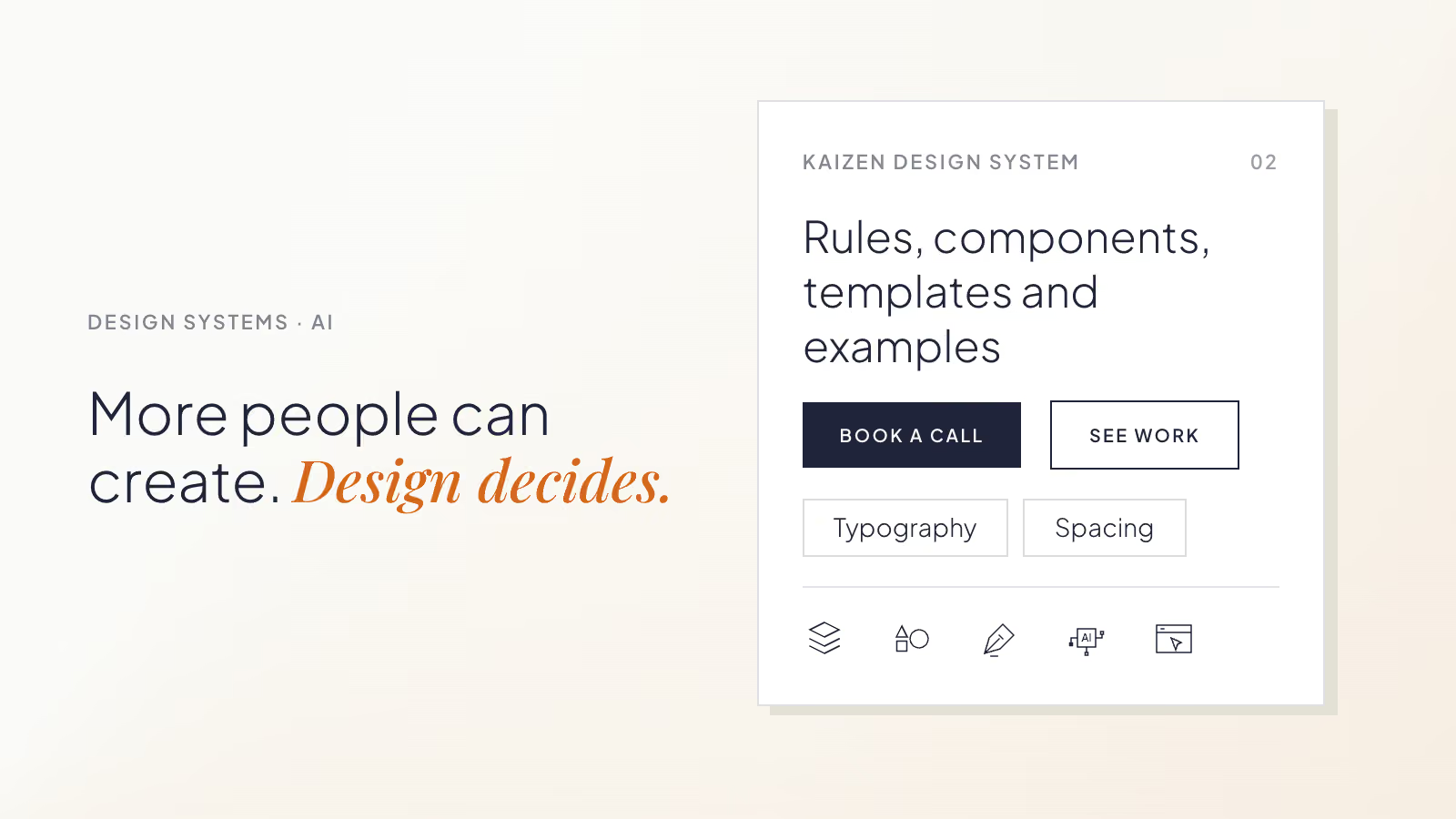
When its rules, components, templates, and examples are available to AI tools, other teams can create within boundaries Design has already defined.

Design does not have to build every first version. It can focus on reviewing important decisions and improving the system when recurring problems appear.

A design system can carry judgment beyond the Design team

A design system gives teams shared rules for creating consistent work.

It can define:

  • Color, typography, spacing, and composition.
  • Components and how they behave.
  • Templates for recurring layouts.
  • Examples that show how those decisions work together.

That context is useful for AI too.

Without it, someone creating a page, presentation, or social post has to explain what “on brand” or “well designed” means in a prompt.

With a design system, many of those decisions are already documented. AI has a reference for how content should be structured, which components belong together, and what kinds of compositions fit the brand.

Teams get a starting point that is closer to the company’s existing visual language without having to describe it from scratch.

What this can look like across teams

Marketing can create recurring assets with less production dependency
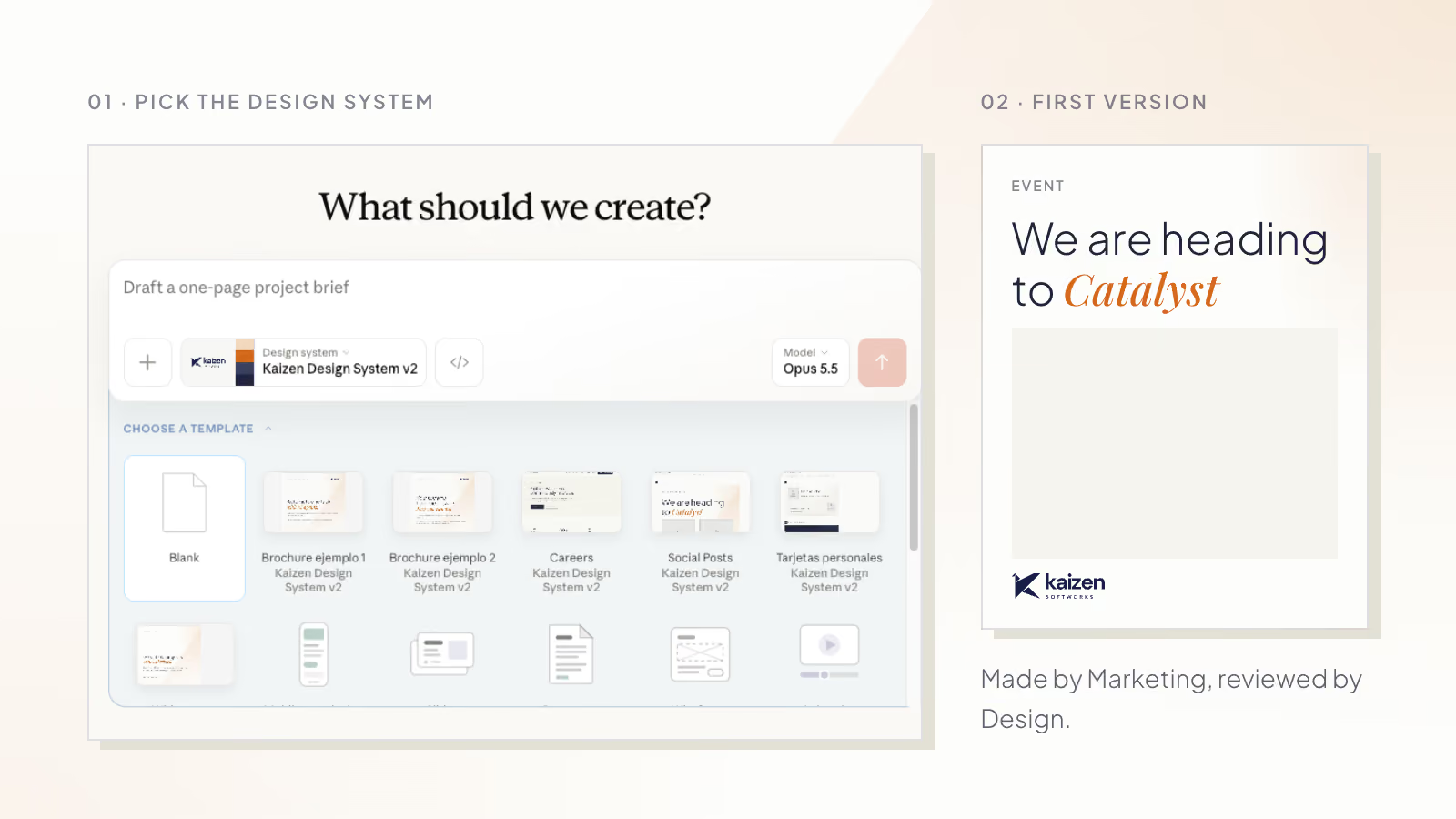
Marketing often works with recurring formats such as social posts, campaign pages, and event assets.

Templates can give the team enough structure to create a usable first version independently. A social template, for example, can define typography, spacing, image treatment, and composition while leaving room for the content to change.

Design can then focus its review on the decisions that need attention.

Product teams can make ideas visible earlier
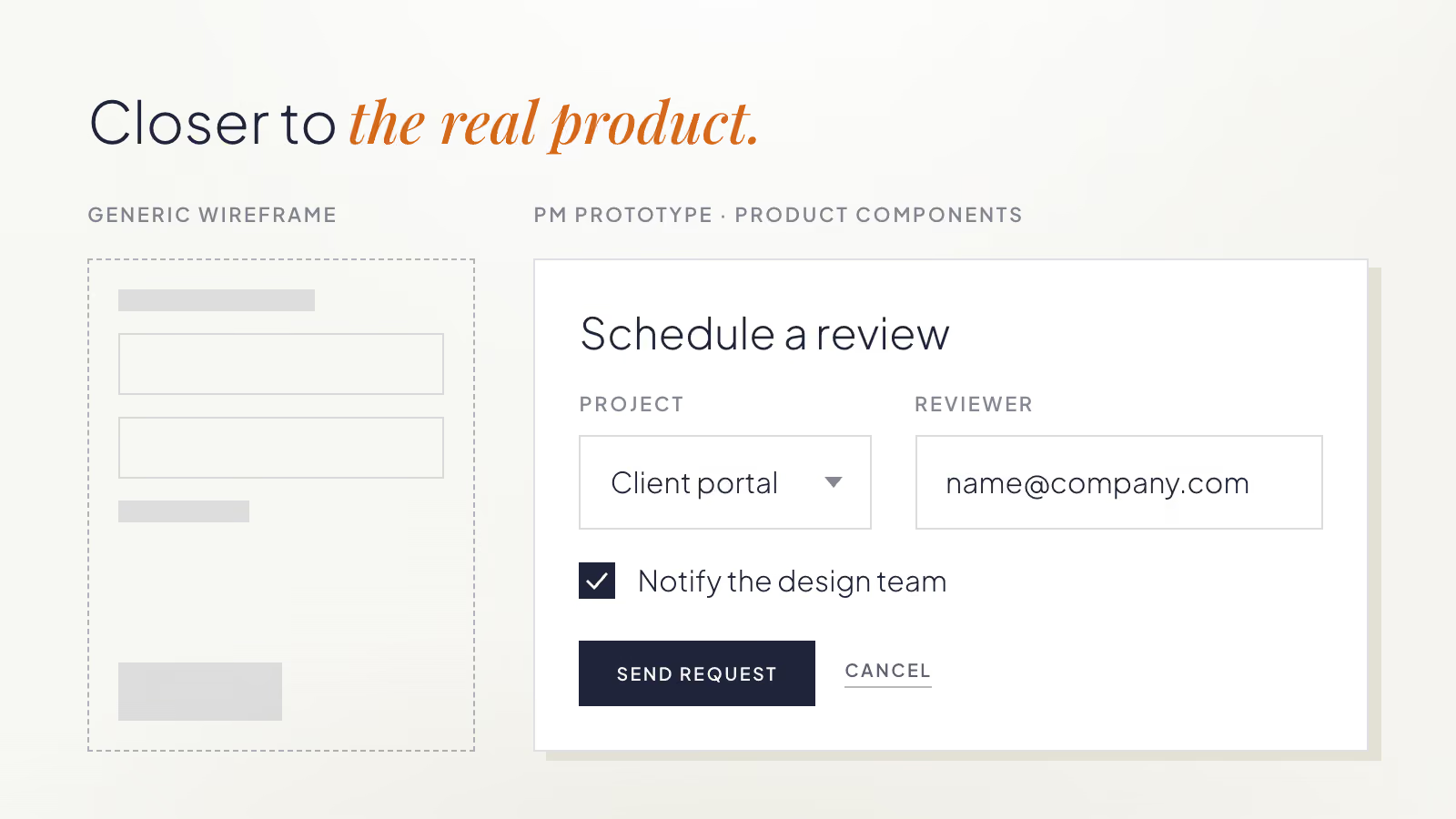
Product managers often need something visual before they need production-ready design.

If an AI tool has access to the same components and rules the product already uses, a PM can create a rough prototype that is closer to the real product than a generic wireframe.

The prototype is not a design direction by itself. It gives Product and Design something concrete to discuss.

Instead of spending time explaining what an idea might look like, they can focus on whether the flow makes sense, what needs to change, and where deeper design work is needed.

Generated work can show where the system is weak

AI does not only use the design system. Its output can also reveal where the system needs more guidance.

We saw this while using our own design system with AI at Kaizen.

Our Design team created the system while redesigning the Kaizen website. It documented the site’s colors, typography, composition rules, components, and templates. Marketing later began using that same system with AI to create website prototypes and social content.

One pattern kept appearing.

The AI put almost everything inside boxes.

Text, images, and entire sections appeared inside containers, even when a more open composition would have worked better.

Design reviewed the source material and found that many of the examples and rules leaned toward contained compositions. The AI was reproducing the patterns it had been given.

The team added guidance and examples for other layout approaches. The generated work became more varied and used more open compositions.

Instead of correcting the same problem in each new asset, the team improved the guidance that influenced future outputs.

That is one of the useful side effects of this process: recurring corrections can point to gaps in the system itself.

Autonomy still needs boundaries

Giving more people the ability to create does not mean every deliverable should follow the same workflow.

A recurring social post built from an established template may only need a quick review. A new product workflow may need much more involvement from Product and Design before anyone treats the prototype as a direction.

Teams can start by agreeing on three things:

What can teams create independently?

Identify recurring formats where the main design decisions are already understood.

What needs Design review?

Decide which outputs need a light check and which need deeper involvement.

What should go back into the system?

When the same correction happens repeatedly, update the shared rule, component, template, or example.

These boundaries make it clear where teams can move independently and where Design’s judgment is still needed.

What this changed for us at Kaizen

Before introducing this process, a LinkedIn visual could take more than two weeks from request to delivery once other priorities, coordination, review, and revisions were included.

We now estimate that a similar piece can move from copy to something ready to publish in about one afternoon.

For website work, a process that previously took around two weeks can now start with a Marketing-generated prototype in about two days, followed by roughly two days of Design refinement and production.

These are elapsed turnaround estimates, not active design hours. Reusable templates, the design system, clearer responsibilities, and the review process all contribute to the difference.

The biggest change is where the work starts.

Marketing can reach a concrete first version sooner. Design can spend more time refining important decisions and improving the system that will influence the next piece too.

For teams exploring this approach, start with one repeatable format.

Define the rules, examples, and templates needed to create a reasonable first version. Agree on where Design should enter the process. Then pay attention to recurring corrections.

If the same typography, layout, or composition problem keeps appearing, improve the shared guidance instead of fixing the same issue every time.

The goal is to make Design’s decisions reusable while keeping Design involved where its judgment matters most.

If you are working through the same questions, we can help you turn your existing design decisions into practical rules, templates, and review workflows your teams can use with AI.

‍

·

Oct 21, 2026

How to modernize legacy software without disrupting daily operations

How to modernize legacy software without disrupting daily operations: migration strategy, defining requirements, user validation, and where AI actually helps.

Clock icon for reading time.

12 read time

Read more

Legacy software does not become a problem just because it is old.

It becomes a problem when it starts limiting the business.

In one of our modernization projects, a legacy application was still central to the client's product. Customers used it every day to search and book flights, hotels, transportation, and other travel services.

But maintaining it had become expensive. Routine changes took too long, the technology was no longer supported, and the application struggled to meet current accessibility, usability, and security requirements.

The company needed to replace it without interrupting the customers who depended on it.

There is no single right way to modernize legacy software. The right approach depends on how the system works, how users depend on it, and what it will cost to run the old and new systems during the transition.

TLDR

  • Modernize when the existing system is creating business problems, not simply because the technology is old.
  • Compare incremental migration with building the replacement separately.
  • Treat legacy code as a reference, not the specification.
  • Define scope, expected behavior, and acceptance criteria clearly.
  • Validate the replacement with real users before broad migration.
  • Treat launching the new system and retiring the old one as separate milestones.
  • AI can speed up implementation, but it cannot resolve unclear requirements.

Start with the business problem

An old system may still serve the business well.

Modernization becomes more urgent when maintaining it starts getting in the way of what the company needs to do.

Common signs include:

  • Routine changes taking too much engineering time.
  • Security or compliance requirements becoming harder to meet.
  • Integrations becoming difficult to maintain.
  • Customer requests becoming expensive to deliver.
  • Teams avoiding necessary changes because they fear breaking the system.

These problems give the modernization a purpose.

Instead of asking, “How do we rebuild this application in newer technology?”, ask:

What constraints does the replacement need to remove?

That question helps keep the project focused on business needs rather than technology for its own sake.

Decide how the old and new systems will coexist

One of the first decisions is whether to migrate gradually or build the replacement separately.

An incremental migration can work well when parts of the system can move independently. But it also means the old and new applications may need to work together for months.

That temporary architecture has a cost.

In this project, the team initially considered releasing parts of the replacement while the rest of the product remained in the legacy application. They even started working that way.

But the approach introduced additional complexity. Each new feature needed to work alongside the legacy system, requiring compatibility, security, and interoperability work that would eventually have to be removed. With tight deadlines, the extra development effort and future maintenance costs made this approach impractical.

The team decided to build the replacement separately while keeping the legacy application in production. Once the new application was ready, selected customers began using it and reporting issues or missing functionality before the broader migration.

In other projects, moving functionality gradually has made more sense because workflows could be separated cleanly.

The useful question is:

What temporary work does each migration strategy create?

If gradual migration requires months of disposable compatibility work, a separate replacement may be easier to control. If capabilities can move independently, incremental migration may reduce risk.

Make that trade-off explicit before development starts.

Treat legacy code as evidence, not the specification

One of the hardest questions in a modernization is simple:

What should the new system actually do?

“Make it work like the old system” is not enough.

Legacy code can show developers how something was implemented. It cannot always explain which behaviors still matter, why exceptions exist, or what users depend on today.

For each piece of work, define:

  • The scope.
  • The expected behavior.
  • Acceptance criteria.
  • Representative use cases or test cases.

Instead of writing:

“Recreate the functionality from the legacy application.”

Start by defining what the user needs to accomplish. Then describe the steps they take, what information they need to see, how the application should respond, and how the team will verify that the feature works as expected.

Modernization projects will uncover missing details. When they do, make the new work visible instead of quietly expanding the task already in progress.

Protect the team's capacity

Keeping the legacy system running while building its replacement creates two workloads.

Production support can quickly compete with modernization work, especially when the same engineers understand both systems.

Before committing to a schedule, decide:

  • Who supports the legacy application?
  • Which legacy improvements still need to happen?
  • Which requests can wait?
  • How much modernization capacity is protected?
  • What happens when a production issue interrupts the plan?

A deadline is more useful when the capacity behind it is clear.

Validate the replacement with real users

Development being complete does not mean the migration is complete.

Before moving everyone, selected customers on this project used the replacement in their real workflows.

They found bugs, missing information, and behaviors the development team had not anticipated.

Technical completeness does not guarantee that users can complete their work.

Before broad rollout, test realistic tasks with real users. Find out where information is missing, which workflows break down, and where people still need the old system.

Separate launch from legacy shutdown

A migration rarely happens in one event.

The replacement may already be serving customers while the team continues fixing gaps and moving the remaining users.

Treat these as separate milestones:

  1. The replacement is ready for testing.
  2. The replacement is ready for production users.
  3. Customers no longer depend on the legacy system.

Before retiring the old application, confirm that users can complete their important workflows, support teams can resolve problems in the new system, and customers no longer need to return to the legacy application.

If users keep going back, find out why.

The replacement may be missing functionality, require more training, or make an existing task harder.

Migration success is not simply having the new application in production.

It is reaching the point where people can stop depending on the old one.

AI makes clear requirements more important

AI was introduced partway through this modernization project and helped the team implement work faster.

It worked best when the task was already clear.

With defined scope, acceptance criteria, and test cases, developers could use AI to produce more of the implementation and spend more time reviewing the code and checking the expected behavior.

Ambiguous requirements stayed ambiguous.

AI can reduce the effort required to produce code. It cannot decide which legacy behavior matters or what the replacement should do.

As implementation gets faster, understanding the system and defining the work become even more important.

Plan the migration, not just the deadline

A delivery date is not a migration plan.

Teams also need to understand:

  • Which pieces of work depend on each other.
  • What can happen in parallel.
  • Where the biggest unknowns are.
  • How much capacity is available.
  • What must happen before users can migrate.

The plan will change as the team learns more about the legacy system. Having one still gives the team a way to understand whether the deadline remains realistic.

What should be clear before modernization starts?

Before committing to a migration plan, answer four questions:

Why are we modernizing?

Identify the business constraints created by the existing system.

How will the old and new systems coexist?

Compare the temporary cost and risk of each migration approach.

How will expected behavior be defined and validated?

Document acceptance criteria and representative use cases, then test them with real users.

What needs to be true before the old system can be retired?

Define this separately from the launch of the replacement.

Any question the team cannot answer identifies work that should happen before rollout.

Modernization should remove constraints, not reproduce them

A legacy application is an important source of information, but it should not dictate every decision about its replacement.

Understand which business rules still matter. Make expected behavior explicit. Choose a migration strategy based on the real dependencies between the old and new systems. Then validate the replacement with the people who will depend on it.

The goal is not simply to replace old technology.

It is to leave the business with software that is easier to change, support, and rely on.

If you're planning a legacy modernization and need help understanding the existing system, comparing migration strategies, or defining a path to the replacement, let’s start a conversation.

‍

llms.txt