In today's tech-driven world, the Cloud-First approach has become the norm. If you haven't yet considered moving your existing systems to the cloud or integrating cloud services into your software architecture, you're missing out on opportunities to enhance agility, reduce costs, and gain a competitive edge.
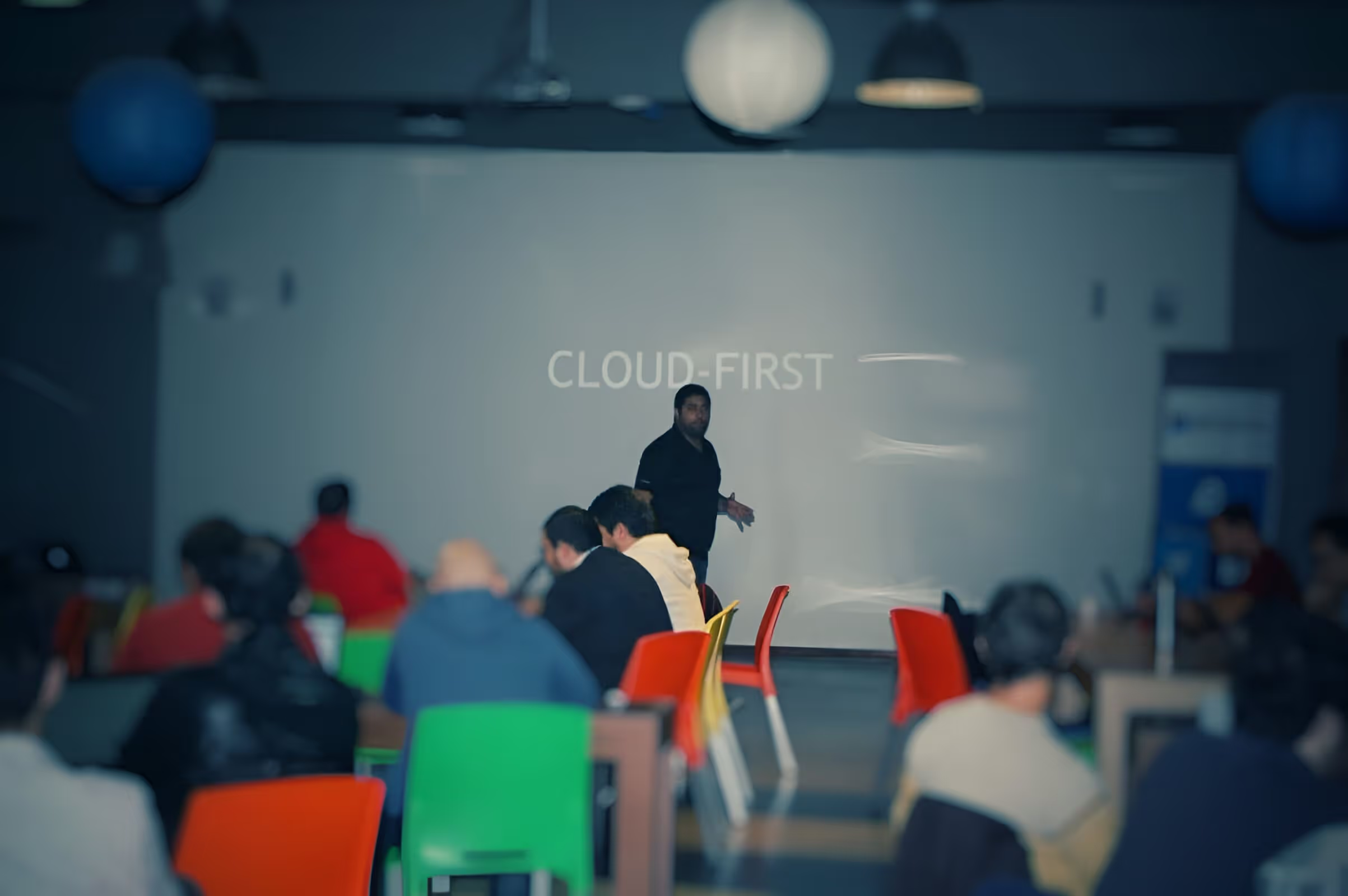
I recently had the pleasure of being the keynote speaker at the Global Azure Bootcamp Montevideo , and this article is inspired by that presentation.
What is Cloud Computing?
Gartner defines cloud computing as: 'A style of computing where scalable and elastic IT-related capabilities are provided ‘as a service’ to external customers using Internet technologies'. The cloud has five key attributes:
Service-based: It abstracts consumer concerns from provider concerns through service interfaces.
Scalable and elastic: Services can scale on demand by adding or removing resources.
Shared: Services share a pool of resources for economies of scale.
Metered by use: Services are tracked using usage metrics, enabling various payment methods.
Internet technologies: Services are delivered through the use of Internet identifiers, formats, and protocols.
To make the most of these cloud attributes, you need a well-thought-out strategy for migration. Every company must decide how to leverage the cloud, focusing on three primary approaches:
SaaS (Software as a Service) solutions offer time and cost savings. They enable you to access software applications via the internet, cutting down on installation and maintenance efforts.
Extending Your Current Infrastructure with the Cloud: This approach involves integrating the cloud into your existing infrastructure, making your systems more agile and cost-effective.
Higher-Level Services: Leveraging higher-level cloud services provides out-of-the-box solutions for common scenarios that can be adapted to your specific business needs, enhancing innovation and cost-efficiency.
By working on these three areas is how we really can transform our business.
Why Microsoft Azure?
At Kaizen Softworks , we are firm believers that Microsoft Azure offers one of the most comprehensive cloud solutions. Gartner has recognized Microsoft as a Leader in three Magic Quadrants of the Cloud: Cloud Infrastructure as Service, Public Cloud Storage Services, and Enterprise Application Platform as a Service.
Microsoft's SaaS solutions, such as Office 365, Microsoft Dynamics, and Power BI, are deployed globally and used by millions of customers.
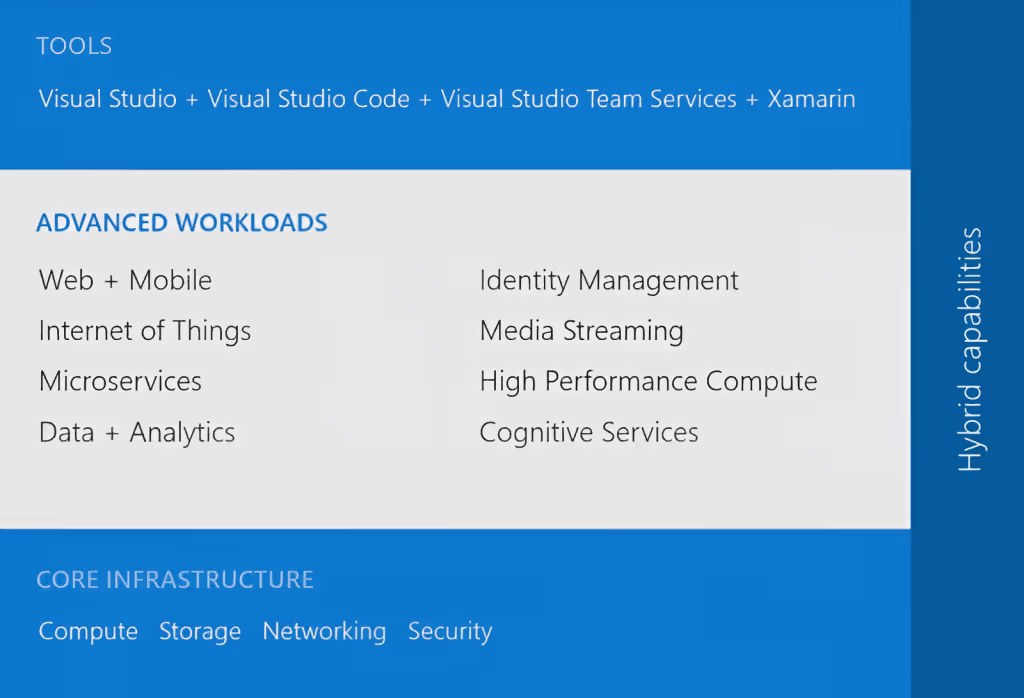
For the other two cloud approaches, Microsoft Azure comes into play. Azure is a comprehensive cloud platform offering both higher-level services and infrastructure.
Amazon Web Services (AWS) is a great IaaS, but they don’t have SaaS, Salesforce has SaaS, but no IaaS, and the examples keep coming. By using a Cloud that covers all the three areas is how we can truly find the value of being agile, save money and integrate smoothly to transform our business.
Azure has a distinct advantage with its 34 regions , doubling what Amazon Web Services provides, and more regions are continually being added.
Azure's Foundational Pillars
Azure is built on three foundational pillars:
1. Choice and Flexibility
Azure provides an array of tools, technologies, and frameworks to choose from. You can select the best tools, programming languages, and platforms for your specific needs.
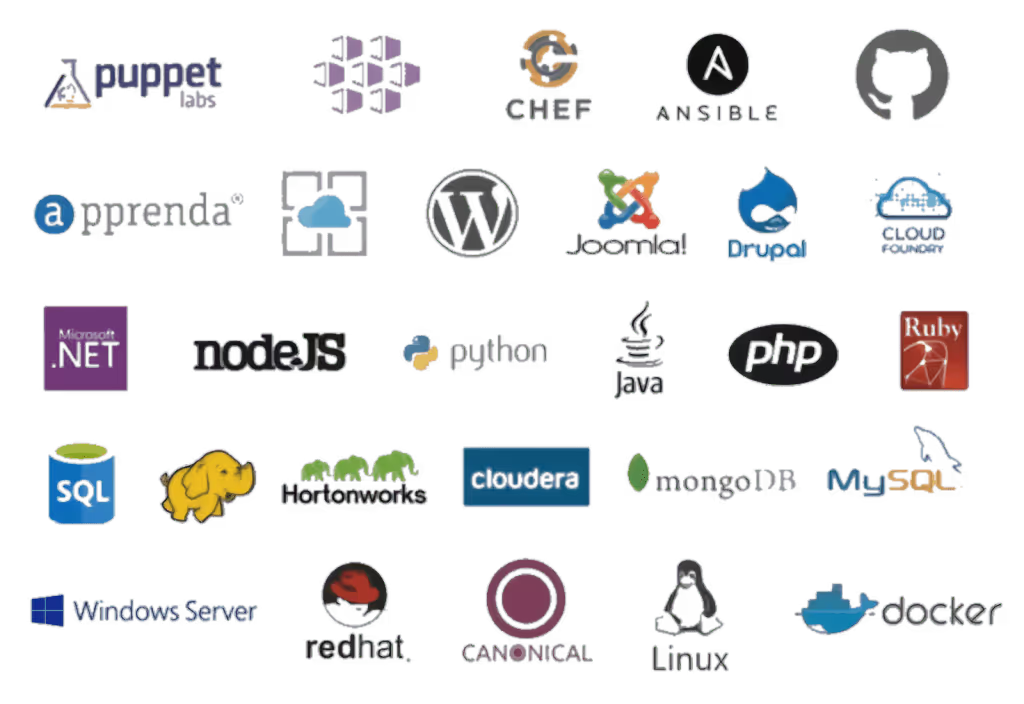
Having every Server OS including Linux with 12 different distributions, almost every DB system, so many different programming languages and platforms allows us to choose the best tool for the job and use the open source or commercial version on a case by case.
Here’s some of the tools and frameworks we can choose from:
We also have something very particular and unique to the Azure cloud, this is the Azure Stack. With it we get the same experience and power of the public cloud but on-premises or on a server provider hosting service.
Same management portal, same APIs, same apps and same DevOps experience. For government and other companies with particular needs and restrictions this is a huge deal. No other Cloud provider has this type of service.
2. Enterprise Ready
Azure boasts a multitude of compliance certifications and standards, making it a preferred choice for 85% of Fortune 500 companies.
Security and Privacy are key to enterprise customers and Microsoft has vast experience running online services developing industry-leading security measures and privacy policies.
Azure focuses on productivity, allowing teams to work seamlessly with integrations between various tools, services, workloads, and infrastructure, creating an efficient DevOps lifecycle.
Using Visual Studio Team Services (VSTS) SaaS solution, we can code on a PC or Mac, using Visual Studio (and even Visual Studio for Mac — in preview), Eclipse or XCode; any IDE, any platform, any language, a SaaS solution used by more than 4 million developers worldwide.
We can have all the private repos we want using Git or TFS, without paying anything additional, or we can integrate with our repos from other platforms like GitHub. VSTS offers a full DevOps cycle with build service, deploy and unit testing; and you know what else? We can compile Java, Android, .NET and some more.
After we passed our Unit Tests we can do some Load Testing simulating thousands of users hitting our web app or backend before moving to a Production environment.
Once everything is tested and ok, we can establish and use our own release policies and deploy our apps and backends to the Azure Cloud. While in Production we can use Application Insights to study the performance of it and keep the cycle running.
Azure Success Stories
The numbers speak for themselves:
More than 120,000 new Azure customer subscriptions are added each month.
1.6 million SQL databases run in Azure.
Azure processes 2 trillion messages per week through Azure IoT.
Azure serves 600 million Azure Active Directory users from 5 million companies.
Over 4 million developers are registered with Visual Studio Team Services.
Over 40% of Azure's revenue comes from startups and ISVs.
Real-World Azure Applications
Now, that’s some serious numbers but I also want to share some cool stories I heard from Scott Guthrie. Azure has been a game-changer for various industries:
AccuWeather, probably the biggest weather company out there, uses Azure to process more than 10 billion data inputs per day and 7 trillion unique data entities where they apply Machine Learning to be able to predict weather, not to mention they are using API services to sell this info to third parties too.
BMW built the whole ConnectedDrive platform using Azure technologies like Azure IoT, Machine Learning services, Data Services and many more.
Rolls Royce, well known for its cars but also for making flight engines are providing their customers a better experience by informing them of engine failures, preventing fails, predicting them, applying analytics and optimizing engine use.
All this by using Azure services like the IoT Suite, Cortana Analytics and Power BI, this last one used to analyze fuel consumption and suggest better routes that optimize it.
Azure App Platform
Azure's App Platform offers Web Apps, Mobile Apps, Logic Apps and API Apps. You can develop your apps in any language like Python, NodeJS, PHP, Java and .NET.
Azure offers features like:
Auto Patching, which means we don’t have to care or worry about updating the Operating System they are running on.
Autoscaling, which allows us to configure some rules to indicate how the app has to react to heavy loads and how to scale down when the load has been reduced.
Easy integration with existing apps, and we can configure continues deployment from our favorite repository system. Nascar and Alaska Airlines are examples of integrations between on-premises applications and new solutions in the Azure cloud. We also have Jet using everything from F# to Azure, I had the pleasure to meet Rachel Reese from the team and I can firmly say they know what they are doing.
I would like to give a special mention in the App Platform to Azure Functions. Azure Functions is a serverless computing service that allows you to code functions and pay only per invocation. It supports multiple languages and can be triggered by various events.
With this we forget about Virtual Machines, Apps and all that stuff and we just code some functions and that’s it. Our code runs in the cloud and we just pay per invocation, which can be triggered on certain events in Azure or by external services.
We can code these functions using F#, JavaScript, C#, Python, Batch, Bash, PHP and PowerShell and even code them using a web based interface, so no need for IDE neither — crazy. The Azure Functions runtime is open source and we can basically get it up and running anywhere, including AWS.
My very good friend Rachel Appel is working in the Azure Functions team at Microsoft, be sure to follow her and stay tuned for her speaking appearances.
Microservices on Azure
When it comes to Microservices, Azure doesn’t leave us alone. We have three different approaches to choose from depending of our needs and situation. The most basic one is VM Scale Sets, then we can jump to Azure Container Service or lastly use Azure Service Fabric like many Azure customers chose including BMW, TalkTalk and many more.
The Azure Container Service has standard Docker tooling and API support, you can orchestrate everything thru Azure, and you can use it on Azure or Azure Stack.
Azure Service Fabric is a prescriptive microservice platform which also uses Docker but with more services like sanity state management and more. You have .NET and Java APIs on Windows Server and Linux and you can deploy it to Azure, Azure Stack, VMWare, OpenStack and AWS.
Data and Analytics
The data management options Azure has to offer is wide. We have some official Microsoft options like SQL Azure, DocumentDB and Azure Redis Cache, but then we also have some other interesting options like Postgres, DB2, Oracle, MySQL, Cassandra, MongoDB, CouchDB and RavenDB.
SQL Azure has more than 1.6 million databases running, it’s a first class citizen developed by Microsoft with high availability, durable and fault tolerant, and you can scale elastically all around the world. For your existing SQl Server databases, fear not my friend, it is compatible and we have a really cool tool to help us: SQL Database Migration Wizard.
DocumentDB is another first class citizen here, a fully managed NoSQL database system made by Microsoft that scales from GBs to 100s of TBs. High performance with support of millions of operations per second.
Another cool thing is that we can scale app data and throughput independently, a feature introduced based on client feedback. I’m also really happy to say that my friend and Microsoft MVP Matías Quaranta is joining the DocumentDB team in Redmond.
The Walking Dead No Man’s Land app that reached number 1 in the Apple App Store is an excellent example of DocumentDB use with 1 billion queries per day with responses of less than 10ms 99% of the time. A video is worth a million words:
We all know systems generate more and more data every day at a pace that only keeps incrementing, but this is really good news if we are clever enough to take advantage of that data, gain insights from it and take intelligent actions.
For this, we have a big suite of options to use depending of our needs to know what happened, why, what will happen and what we should do about it, this suite is called the Cortana Intelligence Suite and includes: Power BI, Machine Learning, SQL Data Warehouse, HDInsight, Data Lake Analytics, Data Lake Store, Stream Analytics, Data Factory, Data Catalog and Event Hubs.
Internet of Things (IoT)
IoT is not left behind in Azure with the Azure IoT Suite offering secure device connectivity and management, business workflow integration and pre-configured solutions to start quickly and customize later to our needs.
Some big names using this Suite but not limited to these are Ford in their newest vehicles and Thyssenkrupp. The market leader in elevator systems uses the Azure IoT Suite to analyze and predict failures so they can optimize the service experience offered to their clients.
Cloud Infrastructure on Azure
If we move into infrastructure services in the Cloud, we can use Virtual Machines, Blob Storage, Active Directory, Virtual Networks, Load Balancers, DNS, Gateways.
I mean… you are a fully covered here too, there’s so many services in the Azure Cloud that we can take advantage from to create all the infrastructure of our systems in one place and manage everything from the same portal.
There’s up to 64 TB of storage per VM with less than 1ms read latency. If we step up, Azure has the largest VMs in the Public Cloud of up to 32 CPU cores and the latest generation of Intel processors, 450 GB RAM and 6.5 TB of local SSD! Crazy!
Companies using Azure Cloud Infrastructure include Walmart, United Nations, Samsung, Toyota, 3M and the list is long.
Cybersecurity on Azure
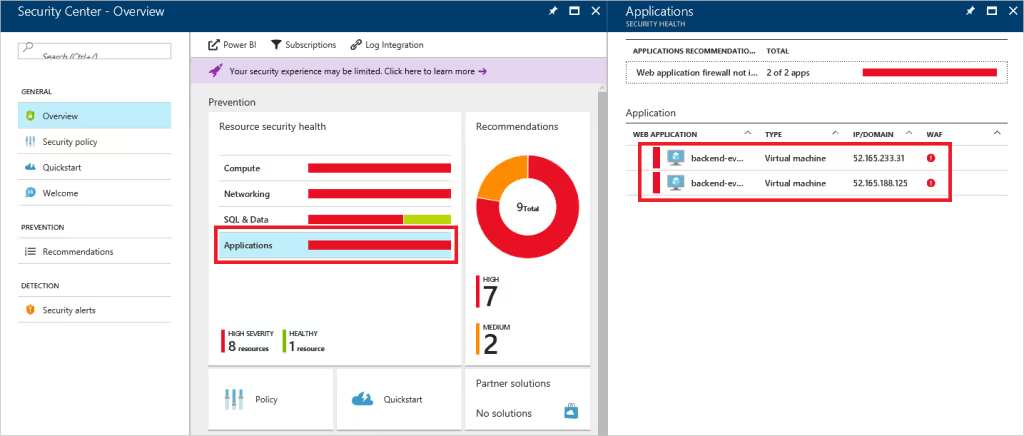
Nowadays hearing about attacks to companies systems is no surprise and Security has being positioned as a top priority for CIOs. Azure Security Center allows you to have visibility and control to prevent, detect and respond to security threats of your Cloud services.
Again, all from the same management portal with integrations to known security solutions like Barracuda, Trend Micro and many more.
Conclusion
I hope I gave you an overview of why Microsoft Azure is a great opportunity to jump into the Cloud, in our experience at Kaizen Softworks it has been a great choice in every project we used it.
We have vast experience using the App Platform and is probably one of the easiest ways to start investigating and doing some tests of your systems with the Azure Cloud. In several of our projects we have used SQL Azure and is not in vain that 1.6M databases are in use in Azure, the experience is practically the same if you are used to work with SQL Server.
Some other great services we have been using for a long time are Azure Active Directory, Blob Storage and Service Bus among other, all of which together allows us to build robust architectures in the Cloud.
As we are big fans of Single Page Applications built using Angular and many other non-Microsoft tech we can also say that serving applications built using these technologies has been a breeze in the Azure Cloud. Choice and flexibilitychecked.
The DevOps experience while working with Microsoft is great from Source Code Repo options to build, deploy, test and analyze, I think that this well integrated lifecycle in the Cloud is what has let us rely so many aspects of the process in the platform and just take care of what’s really important: building the system. The productivity focus of Microsoft is clearly noticed.
As another remarkable point from our experience, we had the opportunity to workimplementing the HIPAA Compliance standard in the Azure Cloud and there are a lot of aspects of it already covered by Azure out of the box, so another great differentiator there. Enterprise Ready verified.
In today's tech-driven world, the Cloud-First approach has become the norm. If you haven't yet considered moving your existing systems to the cloud or integrating cloud services into your software architecture, you're missing out on opportunities to enhance agility, reduce costs, and gain a competitive edge.
I recently had the pleasure of being the keynote speaker at the Global Azure Bootcamp Montevideo , and this article is inspired by that presentation.
What is Cloud Computing?
Gartner defines cloud computing as: 'A style of computing where scalable and elastic IT-related capabilities are provided ‘as a service’ to external customers using Internet technologies'. The cloud has five key attributes:
Service-based: It abstracts consumer concerns from provider concerns through service interfaces.
Scalable and elastic: Services can scale on demand by adding or removing resources.
Shared: Services share a pool of resources for economies of scale.
Metered by use: Services are tracked using usage metrics, enabling various payment methods.
Internet technologies: Services are delivered through the use of Internet identifiers, formats, and protocols.
To make the most of these cloud attributes, you need a well-thought-out strategy for migration. Every company must decide how to leverage the cloud, focusing on three primary approaches:
SaaS (Software as a Service) solutions offer time and cost savings. They enable you to access software applications via the internet, cutting down on installation and maintenance efforts.
Extending Your Current Infrastructure with the Cloud: This approach involves integrating the cloud into your existing infrastructure, making your systems more agile and cost-effective.
Higher-Level Services: Leveraging higher-level cloud services provides out-of-the-box solutions for common scenarios that can be adapted to your specific business needs, enhancing innovation and cost-efficiency.
By working on these three areas is how we really can transform our business.
Why Microsoft Azure?
At Kaizen Softworks , we are firm believers that Microsoft Azure offers one of the most comprehensive cloud solutions. Gartner has recognized Microsoft as a Leader in three Magic Quadrants of the Cloud: Cloud Infrastructure as Service, Public Cloud Storage Services, and Enterprise Application Platform as a Service.
Microsoft's SaaS solutions, such as Office 365, Microsoft Dynamics, and Power BI, are deployed globally and used by millions of customers.
For the other two cloud approaches, Microsoft Azure comes into play. Azure is a comprehensive cloud platform offering both higher-level services and infrastructure.
Amazon Web Services (AWS) is a great IaaS, but they don’t have SaaS, Salesforce has SaaS, but no IaaS, and the examples keep coming. By using a Cloud that covers all the three areas is how we can truly find the value of being agile, save money and integrate smoothly to transform our business.
Azure has a distinct advantage with its 34 regions , doubling what Amazon Web Services provides, and more regions are continually being added.
Azure's Foundational Pillars
Azure is built on three foundational pillars:
1. Choice and Flexibility
Azure provides an array of tools, technologies, and frameworks to choose from. You can select the best tools, programming languages, and platforms for your specific needs.
Having every Server OS including Linux with 12 different distributions, almost every DB system, so many different programming languages and platforms allows us to choose the best tool for the job and use the open source or commercial version on a case by case.
Here’s some of the tools and frameworks we can choose from:
We also have something very particular and unique to the Azure cloud, this is the Azure Stack. With it we get the same experience and power of the public cloud but on-premises or on a server provider hosting service.
Same management portal, same APIs, same apps and same DevOps experience. For government and other companies with particular needs and restrictions this is a huge deal. No other Cloud provider has this type of service.
2. Enterprise Ready
Azure boasts a multitude of compliance certifications and standards, making it a preferred choice for 85% of Fortune 500 companies.
Security and Privacy are key to enterprise customers and Microsoft has vast experience running online services developing industry-leading security measures and privacy policies.
Azure focuses on productivity, allowing teams to work seamlessly with integrations between various tools, services, workloads, and infrastructure, creating an efficient DevOps lifecycle.
Using Visual Studio Team Services (VSTS) SaaS solution, we can code on a PC or Mac, using Visual Studio (and even Visual Studio for Mac — in preview), Eclipse or XCode; any IDE, any platform, any language, a SaaS solution used by more than 4 million developers worldwide.
We can have all the private repos we want using Git or TFS, without paying anything additional, or we can integrate with our repos from other platforms like GitHub. VSTS offers a full DevOps cycle with build service, deploy and unit testing; and you know what else? We can compile Java, Android, .NET and some more.
After we passed our Unit Tests we can do some Load Testing simulating thousands of users hitting our web app or backend before moving to a Production environment.
Once everything is tested and ok, we can establish and use our own release policies and deploy our apps and backends to the Azure Cloud. While in Production we can use Application Insights to study the performance of it and keep the cycle running.
Azure Success Stories
The numbers speak for themselves:
More than 120,000 new Azure customer subscriptions are added each month.
1.6 million SQL databases run in Azure.
Azure processes 2 trillion messages per week through Azure IoT.
Azure serves 600 million Azure Active Directory users from 5 million companies.
Over 4 million developers are registered with Visual Studio Team Services.
Over 40% of Azure's revenue comes from startups and ISVs.
Real-World Azure Applications
Now, that’s some serious numbers but I also want to share some cool stories I heard from Scott Guthrie. Azure has been a game-changer for various industries:
AccuWeather, probably the biggest weather company out there, uses Azure to process more than 10 billion data inputs per day and 7 trillion unique data entities where they apply Machine Learning to be able to predict weather, not to mention they are using API services to sell this info to third parties too.
BMW built the whole ConnectedDrive platform using Azure technologies like Azure IoT, Machine Learning services, Data Services and many more.
Rolls Royce, well known for its cars but also for making flight engines are providing their customers a better experience by informing them of engine failures, preventing fails, predicting them, applying analytics and optimizing engine use.
All this by using Azure services like the IoT Suite, Cortana Analytics and Power BI, this last one used to analyze fuel consumption and suggest better routes that optimize it.
Azure App Platform
Azure's App Platform offers Web Apps, Mobile Apps, Logic Apps and API Apps. You can develop your apps in any language like Python, NodeJS, PHP, Java and .NET.
Azure offers features like:
Auto Patching, which means we don’t have to care or worry about updating the Operating System they are running on.
Autoscaling, which allows us to configure some rules to indicate how the app has to react to heavy loads and how to scale down when the load has been reduced.
Easy integration with existing apps, and we can configure continues deployment from our favorite repository system. Nascar and Alaska Airlines are examples of integrations between on-premises applications and new solutions in the Azure cloud. We also have Jet using everything from F# to Azure, I had the pleasure to meet Rachel Reese from the team and I can firmly say they know what they are doing.
I would like to give a special mention in the App Platform to Azure Functions. Azure Functions is a serverless computing service that allows you to code functions and pay only per invocation. It supports multiple languages and can be triggered by various events.
With this we forget about Virtual Machines, Apps and all that stuff and we just code some functions and that’s it. Our code runs in the cloud and we just pay per invocation, which can be triggered on certain events in Azure or by external services.
We can code these functions using F#, JavaScript, C#, Python, Batch, Bash, PHP and PowerShell and even code them using a web based interface, so no need for IDE neither — crazy. The Azure Functions runtime is open source and we can basically get it up and running anywhere, including AWS.
My very good friend Rachel Appel is working in the Azure Functions team at Microsoft, be sure to follow her and stay tuned for her speaking appearances.
Microservices on Azure
When it comes to Microservices, Azure doesn’t leave us alone. We have three different approaches to choose from depending of our needs and situation. The most basic one is VM Scale Sets, then we can jump to Azure Container Service or lastly use Azure Service Fabric like many Azure customers chose including BMW, TalkTalk and many more.
The Azure Container Service has standard Docker tooling and API support, you can orchestrate everything thru Azure, and you can use it on Azure or Azure Stack.
Azure Service Fabric is a prescriptive microservice platform which also uses Docker but with more services like sanity state management and more. You have .NET and Java APIs on Windows Server and Linux and you can deploy it to Azure, Azure Stack, VMWare, OpenStack and AWS.
Data and Analytics
The data management options Azure has to offer is wide. We have some official Microsoft options like SQL Azure, DocumentDB and Azure Redis Cache, but then we also have some other interesting options like Postgres, DB2, Oracle, MySQL, Cassandra, MongoDB, CouchDB and RavenDB.
SQL Azure has more than 1.6 million databases running, it’s a first class citizen developed by Microsoft with high availability, durable and fault tolerant, and you can scale elastically all around the world. For your existing SQl Server databases, fear not my friend, it is compatible and we have a really cool tool to help us: SQL Database Migration Wizard.
DocumentDB is another first class citizen here, a fully managed NoSQL database system made by Microsoft that scales from GBs to 100s of TBs. High performance with support of millions of operations per second.
Another cool thing is that we can scale app data and throughput independently, a feature introduced based on client feedback. I’m also really happy to say that my friend and Microsoft MVP Matías Quaranta is joining the DocumentDB team in Redmond.
The Walking Dead No Man’s Land app that reached number 1 in the Apple App Store is an excellent example of DocumentDB use with 1 billion queries per day with responses of less than 10ms 99% of the time. A video is worth a million words:
We all know systems generate more and more data every day at a pace that only keeps incrementing, but this is really good news if we are clever enough to take advantage of that data, gain insights from it and take intelligent actions.
For this, we have a big suite of options to use depending of our needs to know what happened, why, what will happen and what we should do about it, this suite is called the Cortana Intelligence Suite and includes: Power BI, Machine Learning, SQL Data Warehouse, HDInsight, Data Lake Analytics, Data Lake Store, Stream Analytics, Data Factory, Data Catalog and Event Hubs.
Internet of Things (IoT)
IoT is not left behind in Azure with the Azure IoT Suite offering secure device connectivity and management, business workflow integration and pre-configured solutions to start quickly and customize later to our needs.
Some big names using this Suite but not limited to these are Ford in their newest vehicles and Thyssenkrupp. The market leader in elevator systems uses the Azure IoT Suite to analyze and predict failures so they can optimize the service experience offered to their clients.
Cloud Infrastructure on Azure
If we move into infrastructure services in the Cloud, we can use Virtual Machines, Blob Storage, Active Directory, Virtual Networks, Load Balancers, DNS, Gateways.
I mean… you are a fully covered here too, there’s so many services in the Azure Cloud that we can take advantage from to create all the infrastructure of our systems in one place and manage everything from the same portal.
There’s up to 64 TB of storage per VM with less than 1ms read latency. If we step up, Azure has the largest VMs in the Public Cloud of up to 32 CPU cores and the latest generation of Intel processors, 450 GB RAM and 6.5 TB of local SSD! Crazy!
Companies using Azure Cloud Infrastructure include Walmart, United Nations, Samsung, Toyota, 3M and the list is long.
Cybersecurity on Azure
Nowadays hearing about attacks to companies systems is no surprise and Security has being positioned as a top priority for CIOs. Azure Security Center allows you to have visibility and control to prevent, detect and respond to security threats of your Cloud services.
Again, all from the same management portal with integrations to known security solutions like Barracuda, Trend Micro and many more.
Conclusion
I hope I gave you an overview of why Microsoft Azure is a great opportunity to jump into the Cloud, in our experience at Kaizen Softworks it has been a great choice in every project we used it.
We have vast experience using the App Platform and is probably one of the easiest ways to start investigating and doing some tests of your systems with the Azure Cloud. In several of our projects we have used SQL Azure and is not in vain that 1.6M databases are in use in Azure, the experience is practically the same if you are used to work with SQL Server.
Some other great services we have been using for a long time are Azure Active Directory, Blob Storage and Service Bus among other, all of which together allows us to build robust architectures in the Cloud.
As we are big fans of Single Page Applications built using Angular and many other non-Microsoft tech we can also say that serving applications built using these technologies has been a breeze in the Azure Cloud. Choice and flexibilitychecked.
The DevOps experience while working with Microsoft is great from Source Code Repo options to build, deploy, test and analyze, I think that this well integrated lifecycle in the Cloud is what has let us rely so many aspects of the process in the platform and just take care of what’s really important: building the system. The productivity focus of Microsoft is clearly noticed.
As another remarkable point from our experience, we had the opportunity to workimplementing the HIPAA Compliance standard in the Azure Cloud and there are a lot of aspects of it already covered by Azure out of the box, so another great differentiator there. Enterprise Ready verified.
An AI coding agent works with the context your team gives it: existing code, documented decisions, instructions, and reference examples. If that context contains inconsistent patterns, the agent can repeat them.
Before implementation starts, engineering leaders need to define how agents should work and how the team will check their output. Choosing a coding assistant does not make those decisions for you.
For greenfield projects, where the team is building a new codebase, our approach starts with Sprint 0. This is when the team sets the architecture, coding conventions, agent guidance, and verification process.
The setup has two parts: guidance that shapes the agent's work before it starts, and checks that catch problems afterward. With both in place, agents can take on more implementation while engineers stay responsible for how the software is built.
Give agents clear guidance before they build
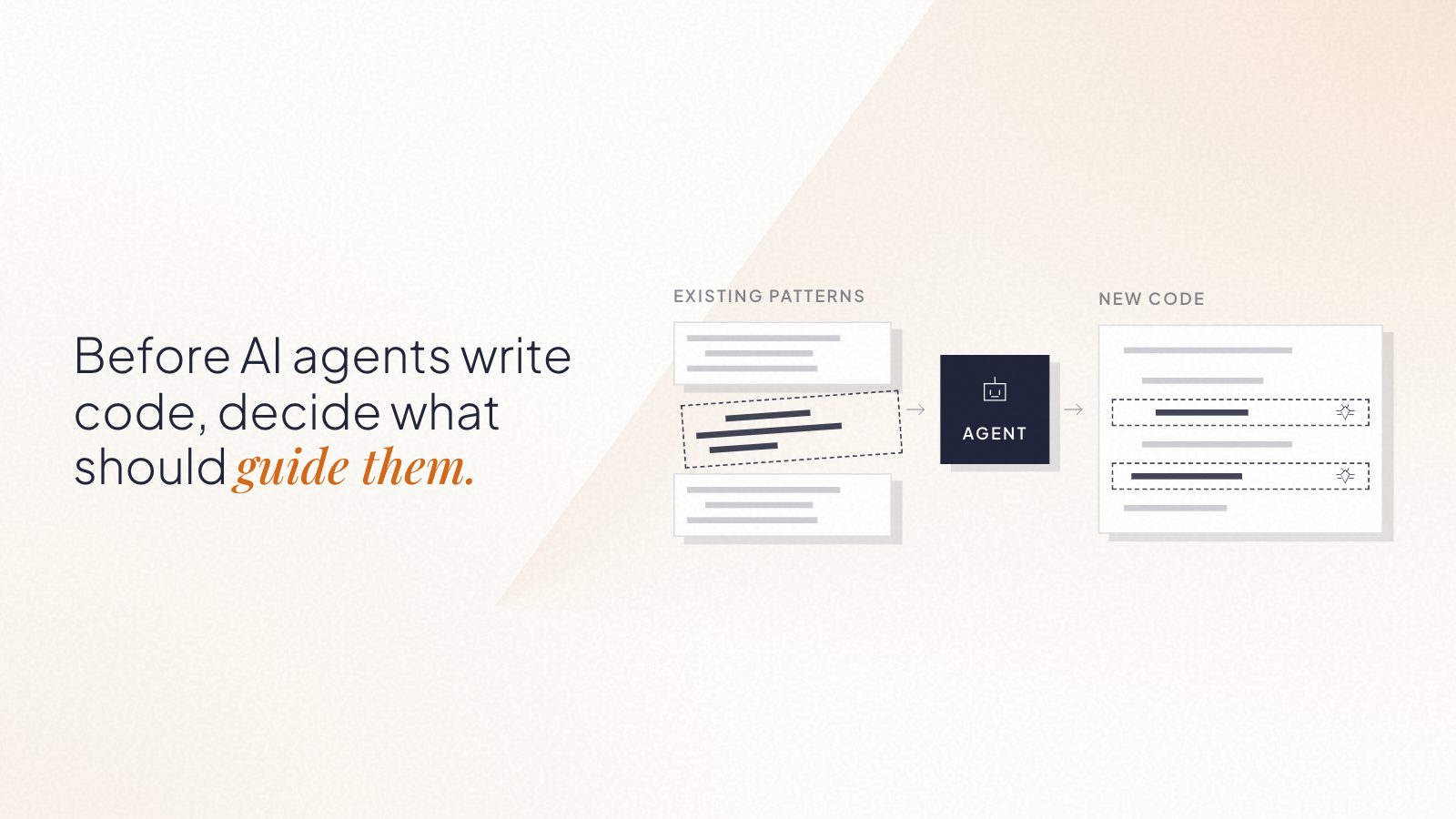
The codebase is part of an agent's instructions. Its structure and existing implementations show the agent which patterns to follow.
A well-structured starting point gives the agent better direction than an empty repository or inconsistent boilerplate. That makes the team's early decisions important because those decisions become context for future work.
Sprint 0 makes that direction explicit through four elements:
Architecture decisions. Record key decisions in lightweight architecture decision records, or ADRs, so agents and developers can refer back to them.
Repository instructions. Use a file such as AGENTS.md to define the rules an agent should follow in the repository.
Skills and prompt templates. Prepare reusable guidance for recurring workflows.
Reference implementations. Keep examples that show the patterns and quality the team expects.
The team also needs to decide what agents can access and do. That includes which files and systems they can see, which tools they can use, what they can change, and which reviews they must pass.
Without enough context, agents have to infer what the team wants. Weak constraints can lead to inconsistent implementations.
Setting those boundaries is part of the engineering work that should happen before agents start building.
Set up verification before relying on agent output
Guidance shapes the work, but the team still needs to check what the agent produces.
That process can include:
Review rules for architecture, security, and token usage.
Automated tests and linting that check code against defined rules.
A sign-off process before changes reach production.
Engineering leaders need to define and maintain these checks. Stronger verification gives the team more confidence to delegate implementation work because problems are easier to detect before they reach production.
As agents take on more implementation, engineers can spend more time on architecture, review, and improving the guidance the agents work from.
Start construction with a clear specification
Implementation needs the same clarity: a description of what the team is building.
In this model, Product explores an idea in a separate environment and validates it with customers. Once the idea is ready for construction, Engineering receives:
A behavioral specification.
A test plan with acceptance criteria.
A link to the prototype for reference.
The experimental code stays in the exploration environment.
During construction, the specification defines the behavior the implementation needs to meet, including edge cases and failure modes. Engineering decides how to implement that behavior within the agreed architecture.
This gives the agent a defined target and gives the developer a clear basis for reviewing the implementation.
Keep engineering judgment in the construction cycle
Sprint 0 prepares the environment, but engineers continue making decisions throughout implementation.
The developer chooses the architecture and reviews the agent's execution plan, including which files it will change and which risks it has identified.
During implementation, the developer supervises the work. Before sign-off, the changes go through manual review, automated checks, and security review.
If the work stops matching the specification or architecture, the developer should stop and reset the cycle.
The guidance from Sprint 0 also needs to evolve. As the team builds, engineers can add new rules and examples, update existing ones, and remove documentation that no longer reflects the codebase.
Maintaining the context agents use becomes part of the development process.
Account for the codebase you already have
This approach is easiest to establish on a greenfield project because the team can set the architecture, conventions, and verification process from the start.
Existing codebases are different. Their previous decisions and inconsistencies are already part of the context an agent sees.
Teams can still introduce the same kinds of guidance and checks. Reaching consistent agent output can therefore take more work.
For a new project, Sprint 0 gives the team a chance to make those choices before implementation begins. Define the architecture, give agents clear guidance, put verification in place, and keep engineers responsible for architectural decisions and release approval.
Then keep that foundation current as the codebase grows.
If your team is starting a new project with AI coding agents, we can help you define the architecture, repository guidance, and verification process before implementation starts.
You've said it in a meeting recently. "With AI, could we just build this ourselves?" It's a fair question. And for the first time in a long time, the answer might be yes, but not for the reasons most people think.
AI has changed the cost equation in two ways: custom software is faster and cheaper to build, and teams can test an idea earlier before committing to a full production build. Together, those shifts make building worth reconsidering in situations where it would have been dismissed a few years ago.
TL;DR
AI made custom software faster and cheaper to build. Projects that used to take six months can now take weeks, at half the cost.
It also made it much cheaper to test an idea, get feedback, and refine what you need before committing to a production system.
Together, those changes open the build vs. buy decision to more companies. The most common mistake is still the same: committing too early, in either direction, before you've tested the problem and the path you're considering.
The old paradigm
For most of the 2000s and 2010s, the standard advice was simple: when in doubt, buy.
Building custom software meant a technical team, months of development, and an upfront investment, typically $100,000 or more, without knowing whether the result would solve the problem. SaaS subscriptions were cheaper, faster, and someone else's problem to maintain. For commodity workflows like payroll, email, accounting, and basic CRM, the math almost never favored building.
This logic was sound. And it still is, for those categories. Mature SaaS tools in commodity categories come with ecosystem value: documentation, integrations, training resources, community support. Building your own payroll system doesn't create competitive advantage. It creates infrastructure you have to maintain.
The problem is that companies applied this rule too broadly, including to the workflows that determine how they compete. The cost of building made that feel reasonable. It wasn't worth it.
For many mid-sized companies, that left an uncomfortable gap: generic tools were no longer enough for the way they operated, but custom software still looked like an enterprise-level investment.
That assumption deserves a second look.
AI changed both sides of the equation
Most of the conversation around AI and software has focused on one thing: building got faster and cheaper. That's true, but incomplete.
The cost of building dropped. A development project that took six to twelve months can now be completed in six to ten weeks. Costs that ran $100,000 or more have come down to $30,000-50,000 for comparable scope, and in some cases less. At Kaizen, our development teams work two to four times faster than before AI-assisted development became part of our process. The cost of the AI is marginal when teams work with clear requirements and structured context. When they iterate without direction, costs add up, but that's a process problem, not a technology one.
The cost of buying is going up. This part gets less attention, but it matters just as much. SaaS companies are embedding AI capabilities into their products and charging for them, separately. A platform that cost $12,000 per year is now $30,000-40,000 once you add the AI tier, the analytics add-on, and the integrations your operations need. For niche tools serving specialized industries, the pricing was already high and the functionality already limited. Add AI tiers on top and the three-year cost comparison starts to look different than it did when you last ran the numbers.
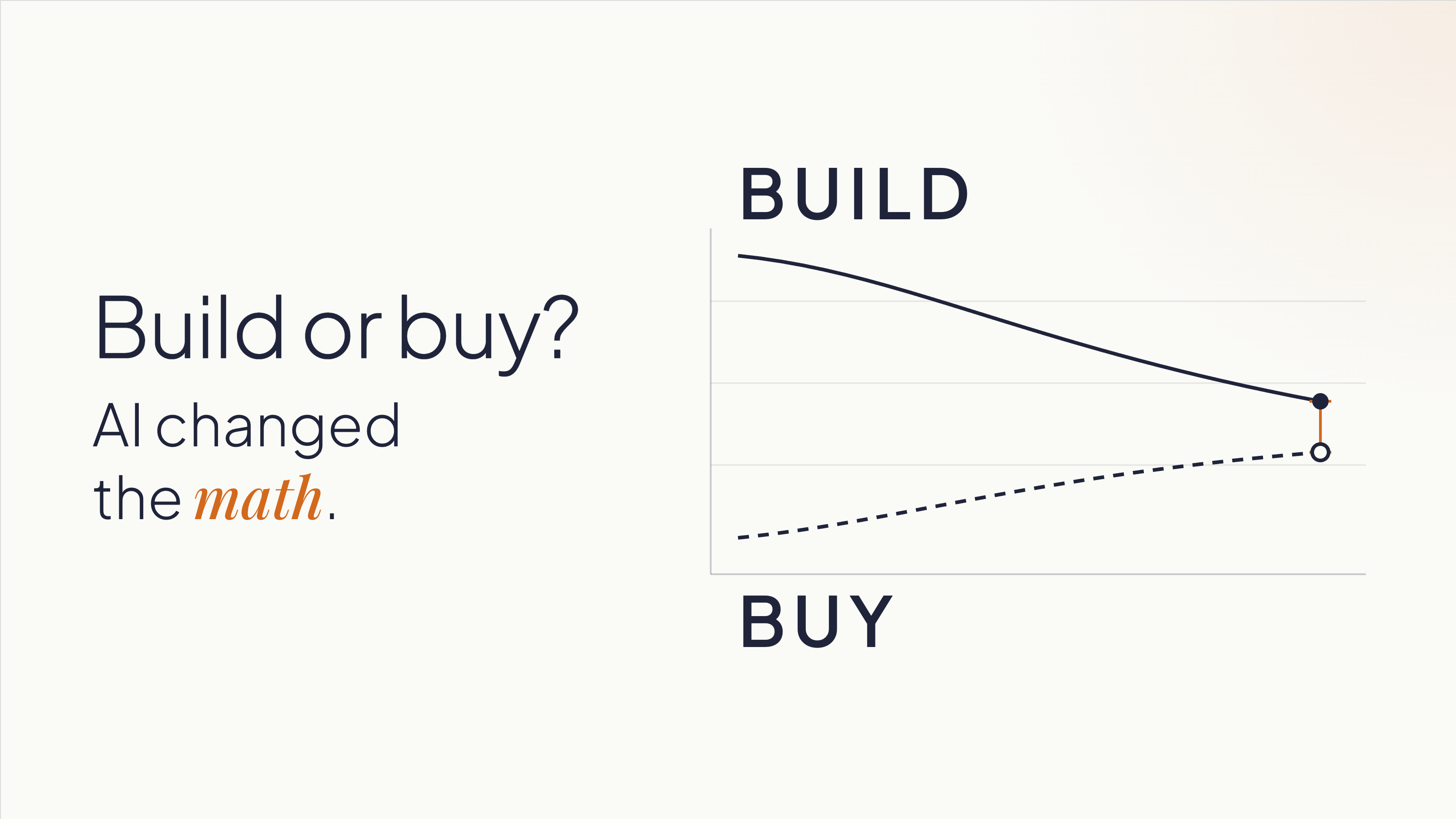
The result is that the two lines are crossing. Custom software is getting cheaper. SaaS, especially for complex or industry-specific use cases, is getting more expensive.
Most companies are still making this decision based on what building cost three years ago.
There's one more thing AI changed that doesn't get enough credit. It lowered the cost of being wrong early. A functional prototype that used to take weeks of development time can now be assembled in days.
That gives teams something concrete to react to, learn from, and change before deciding whether a full build makes sense.
When building makes sense now
The conditions for building have shifted, but the logic hasn't changed entirely. Building still makes most sense when two things are true:
The workflow is part of how you differentiate.
You understand it well enough to start defining what you need.
That second condition doesn't mean having every requirement figured out upfront. It means knowing the business and the process well enough to test assumptions, get feedback, and make increasingly specific decisions.
Companies that start building without that understanding can build the wrong thing faster. The speed advantage AI creates doesn't help if it's pointed in the wrong direction.
Some indicators that a workflow is worth owning:
You're working around your SaaS tools. Spreadsheets patching gaps in a platform. Manual re-entry because two systems don't talk. A Zapier automation that everyone is afraid to touch. These are signals that the tool is containing your problem, not solving it. You're paying the SaaS subscription and building a workaround on top of it. At that point, you're paying twice.
The workflow is where your competitive advantage lives. A logistics company with a particular, high-complexity routing and load assignment process is in a different situation than one that needs basic route planning. The first company's process is their edge, and owning that software means no vendor can change the pricing, pivot the product, or get acquired and leave them exposed. A standard CRM, by contrast, is rarely where a sales organization wins. Salesforce's roadmap reflects the priorities of thousands of customers. If your competitive advantage depends on a process that no SaaS vendor will prioritize, you can't buy your way there.
You shouldn't be adapting your processes to fit a tool. The tool should fit your processes. This is a signal for building: when a company has spent years reshaping how it operates around what a SaaS product can and can't do. That's the opposite of what software is supposed to accomplish. Custom software eliminates that inversion. It's built on domain expertise: knowledge of how your business operates. The software adapts to you.
Vendor dependency is a strategic risk. If a price increase, product pivot, or acquisition could disrupt your operations, you're already exposed. Ownership changes that exposure. It also changes your negotiating position if you stay with a vendor: companies that can credibly leave get better terms.
When buying still makes sense
None of this makes custom software the default answer.
For commodity workflows, buying is still faster and lower-risk. Payroll, basic CRM, email, project management, accounting: these categories have mature tools with strong ecosystems. Build a custom solution here and you've committed to recreating the documentation, integrations, training, and community support that already exist in the products you'd replace. That's rarely worth it.
When your process is still maturing, buying can teach you. A company implementing HubSpot is also adopting a structured methodology for sales, one they can refine as they learn. If you don't know what your ideal process looks like yet, building locks you into one version of it before you've earned the right opinions. Sometimes the right move is to buy, learn, and build later with better information.
When you can't realistically own what you'd build, buying is still the right answer. Custom software is an asset with ongoing maintenance requirements: security patches, library updates, performance monitoring, and someone accountable when things break. If your organization doesn't have that capacity internally, or doesn't have a committed external partner, a build will depreciate without upkeep. Be honest about this before you start.
What AI doesn't change
Two things remain constant, and underestimating either one is expensive.
A prototype is not a production system. AI makes it possible to build a working one in days, but its value is simpler than most people assume: it gives your team something concrete to react to, and those reactions reveal what you need.
One of the most expensive problems in software projects is teams discovering, weeks or months in, that they never agreed on what they were building. Everyone had a mental model. Nobody had tested whether those models matched each other. Show someone a working screen and they'll tell you five things they didn't know they thought until they saw it. That conversation, the one that surfaces the implicit assumptions, the disagreements, the things everyone knew but nobody said, is what the prototype is for.
Building from the requirements that come out of those conversations is a different project than building from initial assumptions. The prototype's purpose is to get you to better requirements faster. Production is a separate project, built from what you learned.
What AI doesn't do is replace the expertise required to architect a system that's secure, scalable, and maintainable over time. Security, data structure, integration design, and long-term ownership decisions don't go away because a prototype came together quickly. A fast prototype that moves to production without rethinking those decisions can accumulate technical debt that costs more than the original development savings. Moving fast into the wrong architecture isn't a win.
AI still needs context. Most teams carry knowledge that's never been written down: how things work, why a decision was made three years ago, what the exception to the rule is. AI doesn't pick that up. Neither does a development partner who starts building without asking the right questions. Explicit requirements matter more now, not less, because the tools that execute on those requirements are faster.
How to decide
Before committing to either direction, three questions are worth working through.
1. Is this process differentiating, and do you know it well enough to define it?
If your answer to the first part is yes, make sure your answer to the second part is honest.
You don't need every requirement upfront. But you do need enough domain knowledge to describe the process, identify what makes it different, and use prototypes or other forms of validation to refine what the system needs to do.
If the answer is "we know how it works but we've never written it down," that work comes first, regardless of whether you build or buy.
2. What does the cost comparison look like over three years?
Include SaaS licensing at realistic price growth (most contracts escalate), implementation, training, integrations, and the cost of the workarounds your team already maintains. Then include the cost to build, plus what realistic ongoing maintenance looks like. The gap is usually narrower than the initial subscription price implies. If you've never run this comparison for your situation, you're deciding without the information you need.
3. Do you have the capacity to own what you'd build?
This means a specific person or team is accountable for what happens after launch, not "we'll figure it out" or "the vendor will handle it." If that accountability isn't concrete and named, the risk profile of building shifts, and buying may still be the right answer even if the cost comparison favors building.
Before you build or buy, validate the path
You don’t need to start building to find out whether building is the right path.
An AI Validation Sprint helps you evaluate the problem, the workflow, and the options before committing significant time or budget. Depending on what you already have, that might include reviewing your current process, comparing existing products, testing key assumptions, or building a lightweight prototype where seeing the workflow in action would help answer an open question.
The goal is to answer questions like:
Is the problem clear enough to solve?
Could an existing product meet the need without forcing major compromises?
What would custom software need to do differently?
Which assumptions should we test before making a larger investment?
What are the main technical and operational risks?
Does the evidence point toward building, buying, or doing more validation first?
Sometimes the answer is to build. Sometimes it’s to buy. We’ve recommended products like Shopify when an existing platform was the better fit, even when custom development was an option.
And if you already have an AI-built prototype, the same process can assess what’s solid, what only works under demo conditions, and what would need to change before it could become a production system.
The goal is not to justify a build. It’s to give you enough evidence to choose the path that makes sense for your business.
Ready to evaluate your options? Start with an AI Validation Sprint.